Missing Data
This guide explains how to use the Missing Data feature in the Loft App.
Missing Data helps when certain devices, rooms, scenes, or other components are not visible in your account.
For example, if some items are missing or not synced properly, this feature refreshes the application and re-syncs the missing components.
Watch The Video Tutorial
Steps to Use Missing Data
-
Open the Loft App
-
Access Profile Settings
- Tap on the Profile icon located at the top-right corner of the screen.
- The Account screen will open.
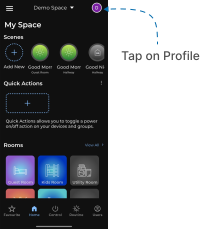
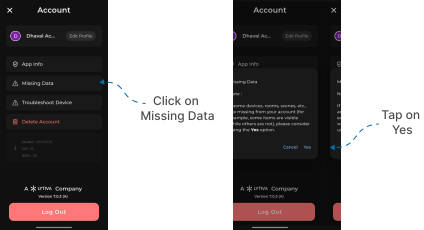
- Use the Missing Data Option
- Tap on Missing Data.
- A confirmation popup will appear.
- Tap Yes to confirm.
This feature performs a soft refresh of the application to recover any devices or data that may not appear due to temporary connectivity or sync issues.